
Anthony Marchione
I am currently enrolled at Butler Tech in their Digital Media program. Before Butler Tech, I kept to myself a lot and never really wanted to volunteer or work anywhere. I didn't want to go to school let alone college. Now I am hoping to go to Miami University to major in Sports Communication and Media. After my 2 years at Butler Tech, everything has changed. I have taken pictures of football and basketball games for Hamilton High School, I recorded a concert for Butler Tech School of The Arts, I have taken pictures and done some marketing for a local business called Hope's Closet, and I have recorded a televised football game for a company named Waycross Community Media. I am so grateful to have been given the opportunities I have received while at this school.
Equipment
Resources I've Used
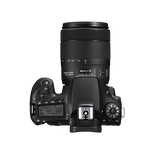
CANON EOS90D - This is the camera I have used for every video and photo I have taken. It is a very good camera and very easy to learn as long as you are willing to take the time to do so.
_edited.png)
GVM LIGHTING KIT - This lighting kit is very good and very easy to set up. It only takes about 20 minutes to learn and 5-10 minutes to set up all 3 on your own.
MANFROTTO TRIPOD - I used this tripod for every video project. It will take about 5 minutes to learn, but after that, it's smooth sailing and smooth shots.


RODE MICS - These you pretty much just need to plug in and turn on. The real issue is fixing and adjusting the audio in Premiere Pro which still isn't to hard to do.
REVO SHOULDER MOUNT - This is really helpful. You screw the camera on the mount itself and it helps stabilize the camera.

ADOBE PHOTOSHOP - I really only used this to make posters for assignments, but it is a very good software for enhancing and manipulating images along with making flyer, posters, etc.
ADOBE PREMIERE PRO - This is an editing software and was used to edit every video on this website. It takes a little bit to learn but it is very helpful in the long run.


ADOBE LIGHTROOM - I used this to edit every single picture on this website. It's not very hard to learn and it is extremely helpful for getting any picture edit done.
Websites/Software

ADOBE AFTER EFFECTS - I use this to make the credits for Encrypted. You can make a lot of different things in it and doesn't take long to learn.
_edited.png)
STUDIO BINDER- This is a script writing software and I used it to write a script for every video on this website.

CANVA - With this you can make and animate poster, logo, business cards, etc. You can even make those things into a video. I used this to make the background of the homepage, the encrypted page, and the documented imparity page. It's a very good software and is very easy to learn.